New Windows Search Experience With Inline Actions is Now Available for Select Insiders
- Laurent Giret
- Oct 07, 2026
-
0
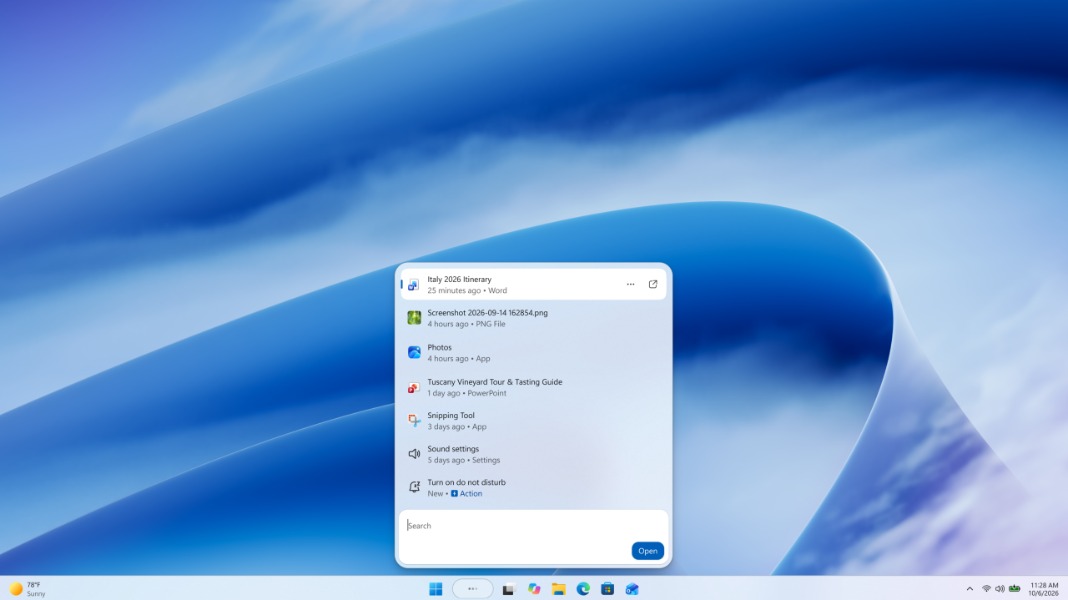
A new Windows Search experience that lets users take quick actions right from the taskbar is now available for Insiders on the Experimental Channel. Microsoft detailed the new feature during its Windows and Surface event earlier today, and it pretty much turns Windows Search into a chatbot-like experience, similar to how Apple transformed Spotlight on macOS.
“We’re beginning to roll out a new Windows Search experience built on WinUI 3 that is faster, more efficient, and features a streamlined design that makes results easier to scan,” the Windows Insider team explained today. “We’re also introducing inline actions, allowing you to quickly complete tasks directly. Turn on dark mode or Bluetooth, adjust your screen brightness, mute your device, or arrange windows from Windows Search.”
At the moment, Windows Search only supports a limited set of inline actions to help users complete familiar tasks without interrupting what they’re doing. Soon, the experience will also integrate with Phone Link to let Windows 11 users perform quick actions on their connected phone.
To try this new Windows Search experience with inline actions, Insiders on the Experimental Channel will need to download the 26H1 build 28120.3181 or the build 26340.9616, then enable it manually via the Feature Flags menu in Settings > Windows Update > Windows Insider Program > Feature flags. On the Experimental Channel, Microsoft is also testing a new Battery Status widget that provides a unified view of battery levels across a PC and its connected devices.
Lastly, Microsoft released two new builds for the Beta Channel today: The build 26220.9606 makes Weather the primary widget on the lock screen to reduce unnecessary distractions. The 26H1 build 28020.3172, however, doesn’t include any new features.