Microsoft Releases New Insider Builds to Dev, Beta, and Canary
- Paul Thurrott
- Sep 19, 2025
-
0
Microsoft has released new Windows 11 preview builds to the Dev, Beta, and Canary channels in the Windows Insider Program.
Here’s what’s new.
Dev and Beta
As is usually the case, Dev and Beta are getting the same features and other changes. Those with PCs enrolled in the Dev channel can install cumulative update KB5065786 to upgrade Windows 11 version 25H2 to build 26220.6690. Those with PCs in the Beta channel can also install update KB5065786 (is this a first?) and upgrade Windows 11 version 24H2 to build 26120.6690.
New features include:
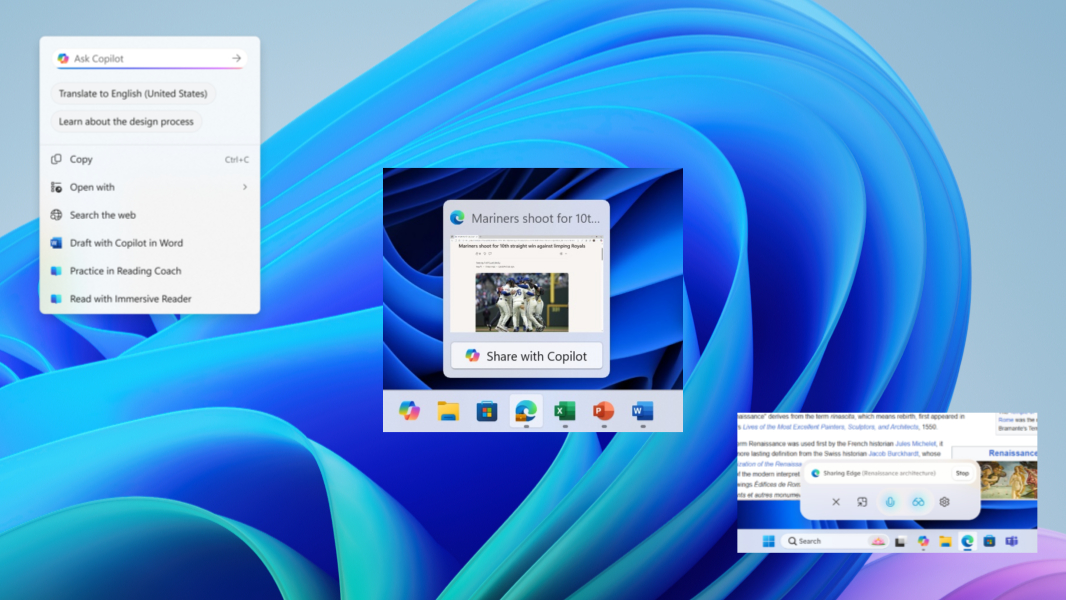
Translation with Microsoft Copilot in Click to Do. If you have a Copilot+ PC, you can translate on-screen text captures by Click to Do using Microsoft Copilot. “When you select text that is in a different language from your Windows display language or preferred language settings, a translation suggestion will appear,” Microsoft explains. “The selected text is sent to the Copilot app, which provides the translation seamlessly within the experience.”
Share with Copilot. Just as you can share a window with Microsoft Teams by mousing over its icon in the Taskbar, you can now do the same with the Copilot app. This will open Copilot so you can use Copilot Vision to scan, analyze, and get insights about the contents of that window.
Accounts management improvements. The Accounts settings page in the Settings app is getting updated to make it easier to add and manage your accounts from a single place. The Email & accounts sub-page has been renamed to Your accounts.
Canary
Canary is once again a nothing burger with “a small set of general improvements and fixes that improve the overall experience for Insiders running this build on their PCs.” And Microsoft has removed Advanced settings from the Settings app temporarily and returned to the old For developers interface for now.